Whether you are a business owner, content creator, or user, Facebook ads help you connect with the broader digital marketplace out there.
Not only does it boost your brand awareness, but it also introduces you to the best marketing/shopping platforms & products of your choice.
However, sometimes, the excessive frequency of the ads shown on this Meta platform or irrelevant (though rare) ad content might appear a bit intrusive to you.
Well, we know exactly how to get rid of ads on Facebook easily.
So, quickly check out the blog till the end, where we’ll be talking about some advanced settings, options, & features available on Facebook that can help you get rid of the targeted ads.
How Facebook Ads Work?
No!
We’re not discussing this because it’s supposed to be answered in this blog.
We’re discussing this because you need to know how these things work first in order to prevent them from appearing on your feed every time.

According to reports, the majority of the Facebook ads (all Meta ads, including those on Instagram) are targeted.
That means, Facebook shows you relevant ads based on your previous user data, demographics, products you viewed recently, your site browsing/navigation trends (off-platform behavior), interests, & specific preferences.
The algorithm tracks all this user data & shows ads accordingly for a broader audience targeting (if you’re a marketer) and an improved user/buyer’s experience (if you’re planning to purchase something).
But it starts to bother you when your feed is full of these ads.
Isn’t it?
So, Why Do You Come Across So Many Ads on Facebook?

Well, because there are a lot of things going on backstage!
Meta is currently one of the two largest digital advertising platforms in the world. According to reliable resources, Meta, powered by AI ad tools like Advantage+, is expected to surpass Google Search in early 2026.
Recent reports also confirm that Meta generated $196+ billion in advertisement revenues in 2025 with an increased turnover of 22% year-over-year.
Now imagine the average daily user engagement on Meta Platforms is 3.54+ billion, and advertising alone constitutes nearly 97% of Meta’s revenue.
Does that make sense now?
That’s why Meta platforms, including Facebook keeps on maximizing ad density on your feed.
But, Do You Really Wanna Block Your Facebook Ads?
Well, that’s definitely your personal choice.
But we’re here to make you aware of the true scenario.

Honestly, if you’re just a Facebook user, not a marketer/business owner, and you’re concerned about your digital privacy, it’s better to block these ads or at least update the platform settings (we’ll discuss this later) to mitigate potential risks.
In fact, some users have also reported that the Facebook ads they see are based on their private conversations, which raises some serious concerns.
As we already said before, Facebook tracks your off-platform interactions, locations, browsing behavior, monitors your user activity on other sites, collects, shares, sells, & even uses your personal data (Name, Address, etc.) to display targeted ads. (Facebook’s Privacy Policies clearly mention all these for the sake of improved user experience)
So, Are Facebook Ads Dangerous?
Yes, if the below-mentioned risks bother you:
👉Security risks on fraudulent sites
👉Phishing attempts
👉Transactional scams
👉Malware threats
👉Encountering offensive/disturbing content
👉Landing on fake websites
So, to protect your devices from unwanted malware/system viruses, reduce unnecessary clutter on Facebook, & prevent an intrusive/repetitive social media experience, “it’s better to block these Facebook ads”, suggests our digital marketing experts.
But, before we get into the process of how to get rid of ads on Facebook, let’s quickly learn first how to limit the data it collects.
Limiting The Data Collected by Facebook
This won’t stop the ads from appearing on your feed.
But, you will have better control over your personal data and decide on what you want to share with this Meta platform and what not.
Let’s Check Out The Quick Hacks First

✔️Use the Privacy Checkup tool & choose when you can see your posts or review your app permissions
✔️Go to your phone’s settings and disable Facebook’s access to your contacts, location, & microphone

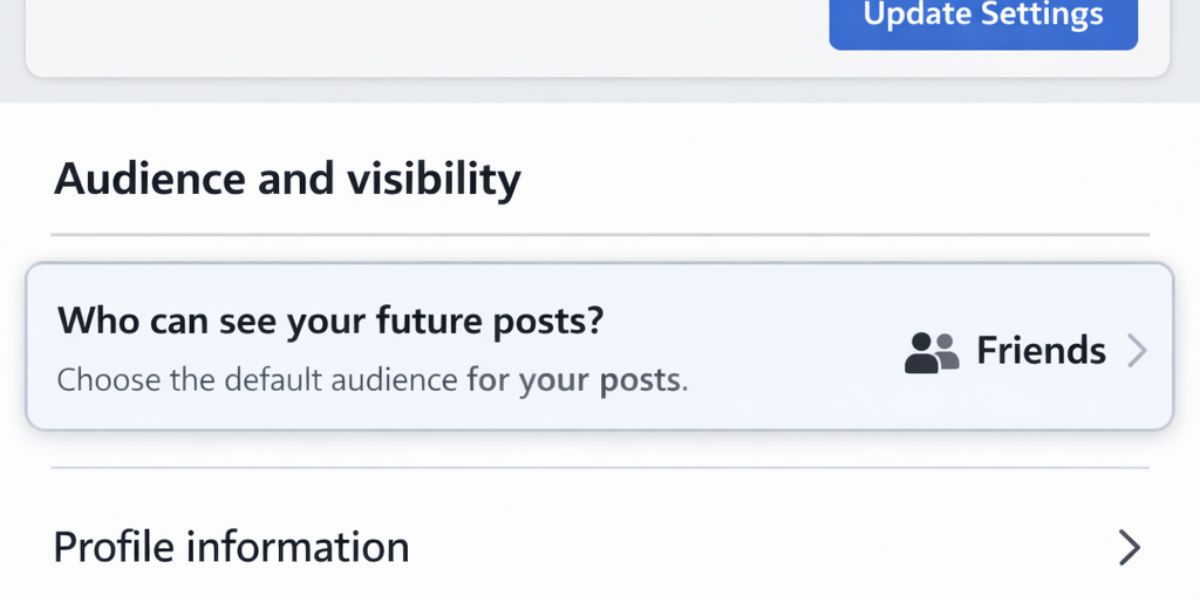
✔️Set your default audience settings to “Friends” rather than “Public” for restricted profile visibility
✔️Review apps & their settings that use Facebook to log in and remove the unnecessary third-party apps to remove data access
✔️Start browsing Facebook on incognito mode & make sure you log out of your account after each session
2 Actions You Must Carry Out
1️⃣Disable your “Off-Facebook Activity” to prevent other third-party apps/websites from tracking, collecting, or using your profile data.
This is how you do it:
Settings>Your Facebook Information>Off-Facebook Activity>Clear Previous Activity>Manage Future Activity>turn it off
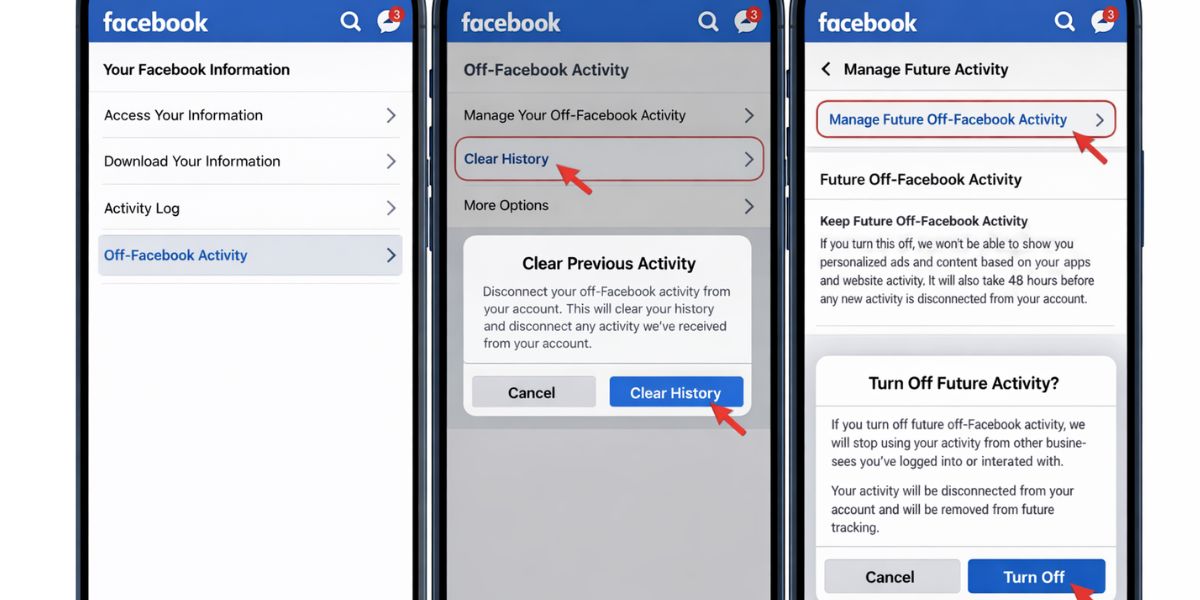
2️⃣ You can simply adjust your Facebook ad preferences to limit targeting.
The steps include:
Facebook>Ad Preferences>Manage Info>Activity information from ad partners> select “Don't make my ads more relevant by using this information".
How to Get Rid of All The Ads on Facebook?

☑️Stop Suggested Pages
This will reduce irrelevant ad content on your feed because this way, you are restricting Facebook from promoting similar pages on your feed.
Now, Here are A Few Things to Do
➡️Hide The Specific Pages
✅Click on the three dots in the top right corner of the post
✅Select “Hide ad”
✅Choose “Hide all from [your page]”
✅Or choose “Hide this post”
➡️Adjust Your Ad Preferences
✅Facebook>Settings & Privacy>Settings>Accounts Center>Ad preferences
✅Select “Advertisers you saw ads from”>hide advertisers
✅Select the topics under “Ad topics” that you don’t like
✅Turn off "Activity information from ad partners" + "Ads with your social actions
➡️Use A Browser Extension
✅Install a free browser extension that completely removes suggested posts and ads from your desktop feed
➡️Adjust Page Recommendations
✅Open your Facebook page
✅Navigate to “Settings”
✅Click on “General”
✅Find “Similar Page Suggestions”
✅Toggle it off
➡️Change Your Feed View
✅Simply switch your feed to “Most Recent” or “All” instead of “Feed” or “Home”. This will significantly reduce the number of AI-suggested ads appearing on your feed.
☑️Disable Your Personalized Ad Tracking Settings
This is the best option you have if you want to know how to get rid of ads on Facebook, based on your relationship status, job titles, employer details, etc.
The steps include:
✅Facebook>Settings & Privacy>Settings>Ads
✅Select “Data about your activity from partners” + “Categories used to reach you”
✅Turn off “Personalized Ads”
✅Next, click on Ad Preferences>Your Categories>remove the categories
☑️Stop Ads Based on Data from Advertisers & Offline Interactions

This is another effective way to limit Facebook’s ability to track your off-platform behavior, navigation patterns, and previous interactions with advertisers.
Disabling your personalized ad settings on Facebook can help you prevent the platform from tracking the partner sites, apps, and your offline purchases and displaying ads on that basis.
The Steps Include:
Facebook>Settings & Privacy>Accounts Center>Ad preferences>Manage Info>Activity information from ad partners ➡️ Select “Restrict this data”
So these were some of the common ways to get rid of unnecessary Facebook ads or stay away from irrelevant ads. However, we can suggest another way that can help you limit the number of ads you see on your feed.
Reduce Ad Prominence on Your Feed

Prioritize Friends And Pages You Follow
This won’t remove the ads entirely, but will definitely reduce the number of ads that you see. Just by changing this Facebook setting, you can stop your feed from getting flooded with ad-heavy posts.
Here are The Key Strategies
✔️Switch your default “Home” feed to “Feeds” to see posts only from your friends, groups, and the pages you follow
✔️Add up to 30 “Friends” & “Pages” to your “Favorites” list to make sure that your feed mainly features posts from them
✔️Like, comment, and share posts from your friends and family to train the Facebook algorithm so that the platform features only this content over the ads
Now, if you still want to know how to get rid of ads on Facebook completely, this is the one to try out.
Block Your Facebook Ads

Hiding individual ads won’t work for you if you want to get rid of all the ads on Facebook. This might limit the number of ads that you see, but you won’t be able to get rid of them.
That’s why the only option you have is to use ad blocker tools or extensions that will completely filter out the Facebook ads.
The Steps Include:
➡️Search for an ad blocker on Google (for desktop)
➡️Install the Chrome extension
➡️Ensure the extension is active
Or
➡️Go to Play Store (for Android)/App Store (for Apple)
➡️Download & install an Ad Blocker
Now, the question is:
How to Select The Best Ad Blocker?
👉Make sure the blocker targets all the sponsored posts, banners, & sidebar ads
👉Ensure the ad blocker is compatible with the search engine browser of your choice
👉The ad blocker should feature “filters” to hide specific elements
👉Make sure the tool also blocks trackers
Check out the rating & reviews of a particular ad blocker before you download it.
There are multiple free ad blockers available on the Play Store or App Store, and most of the Chrome Extensions are free. But if you want advanced functionality features, you can also check out their premium versions.
Reporting Misleading Ads on Facebook

The Meta guidelines always prioritize a better user experience. Considering that, if you feel that a particular ad is offensive, spammy, or misleading, you can report it.
Here’s How to Do It:
👉Simply click on the three dots at the top right corner of the ad
👉Click on “Report Ad”
👉Choose the reason
👉Select “Submit”
Or
👉You can simply go to the Meta Ad Library
👉Search for the advertisers (if you remember the page/business profile)
👉Search for the specific ad
👉Click on it
👉Tap on the three dots
👉Select “Report Ad”
…follow the next steps as mentioned before.
If the post is a group post, select “Report to Admin” and let the group moderators learn about it immediately.
How to Get Rid of Ads on Facebook Easily?

If you’ve been here all along to know how to get rid of all the ads on Facebook, they must be bothering you a lot lately.
Unfortunately, it’s not possible to completely remove all Facebook ads because they are central to Meta’s latest business model. In fact, Meta platforms provide you with a free service only in exchange for showing personalized ads.
However, you can change your preference in ad settings, limit the numbers, prioritize the type of content you want on your feed, and even hide a specific ad.
But, to get rid of them entirely, you need to use third-party Ad Blocker tools that will completely block them.
So, that’s it for today!
We hope you enjoyed reading the blog.